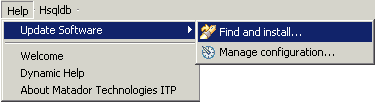
This is the Matador Technologies update site where you can download the newest updates of the Integrated Testing Platform (ITP). You can get to it from the ITP by clicking in the upper menu Help -> Software Updates -> Find and Install :
From the dialog that will appear click on the Select for updates of the currently installed features and then press Finish
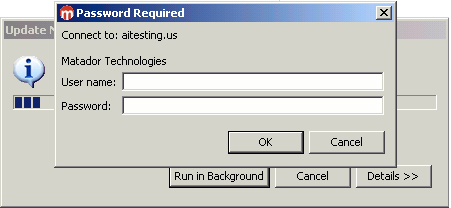
In the next dialog enter the user and password provided by Matador Technologies consultant.
After providing the user and password the update should begin.
If you do not have the access to the Internet on the computer with the ITP installation, you can download the update files from Update Site, create a local copy of the update site and point the ITP update mechanism to the local update site.
Matador Technologies offers next generation test automation software allowing automation where previously not possible. Matador eliminates many of the challenges with traditional test automation tools: complex script maintenance, scalability, limited visibility behind the GUI, and difficulty pinpointing error location.